Advanced Shapes
16. Lathe Shapes
Lathe shapes are surfaces of revolution — defined by a 2D profile curve that's rotated around the Y axis.
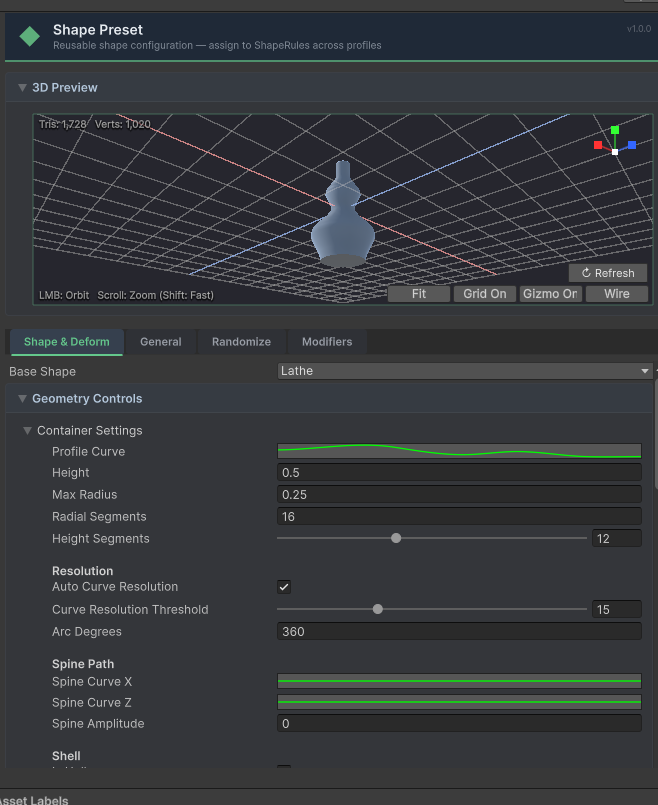 The Lathe Profile inspector showing profile curve points, shell settings, caps, and a real-time 3D preview.
Built-in Lathe Shapes
PileGen includes 40+ lathe profiles organized by category:
- •Bottles — Wine, beer, spirits, potion bottles
- •Cans — Soda cans, tin cans, paint cans
- •Jars — Mason jars, apothecary jars, cookie jars
- •Kitchen — Cups, bowls, pitchers, teapots
- •Industrial — Pipes, funnels, containers
- •Architectural — Columns, pillars, balusters
- •Fantasy — Potion flasks, chalices, urns
- •Utility — Buckets, barrels, vases
- •Debris — Broken pottery, shards
Creating a Lathe Profile
- •
Assets > Create > PileGen > Lathe Profile(orMeshGen > Container Settings) - •Edit the Profile Points — each point defines (radius, height)
- •Adjust Segments (radial resolution) and Rows (vertical resolution)
- •The preview updates in real-time
Using in a Shape Rule
- •Set the shape's Base Primitive to
Lathe - •Assign your Lathe Profile (Container Settings) asset
17. Compound Shapes
Compound shapes are multi-part objects assembled from multiple primitives, each with its own transform offset, material, and palette settings.
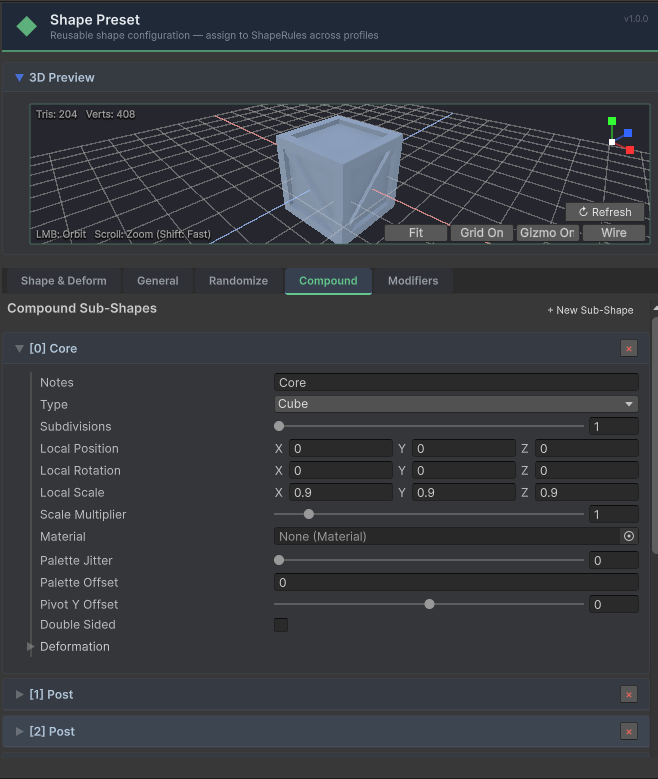 The Compound Shape inspector showing a multi-part assembled object with sub-shapes and preview.
Sub-Shape Properties
Each sub-shape has:
- •Type — Any primitive (Cube, Cylinder, Lathe, Extrude, etc.)
- •Local Position / Rotation / Scale — Offset from the assembly pivot
- •Scale Multiplier — Uniform scale for this sub-shape
- •Material — Per-sub-shape material override (Standard mode)
- •Palette Offset — Fixed palette index offset (LowPoly mode), e.g. Trunk=0, Leaves=+2
- •Palette Jitter — Random palette index variation per instance (±N slots)
- •Arc Degrees — For cylindrical sub-shapes (360 = full, 180 = half)
- •Pivot Y Offset — Vertical pivot alignment
Built-in Compound Shapes
- •Wooden Crate — Box with internal slats
- •Wooden Pallet — Flat platform with support beams
- •Wooden Chair — Seat with legs and back
- •Wooden Table — Flat top with four legs
Creating a Compound Profile
- •
Assets > Create > PileGen > Compound Profile - •Add Sub Shapes — each is a primitive with position, rotation, and scale offsets
- •Preview updates in real-time
22. Extrude & Rock Primitives
Extrude
Creates a 3D mesh by sweeping a 2D silhouette curve along a 3D Bézier path.
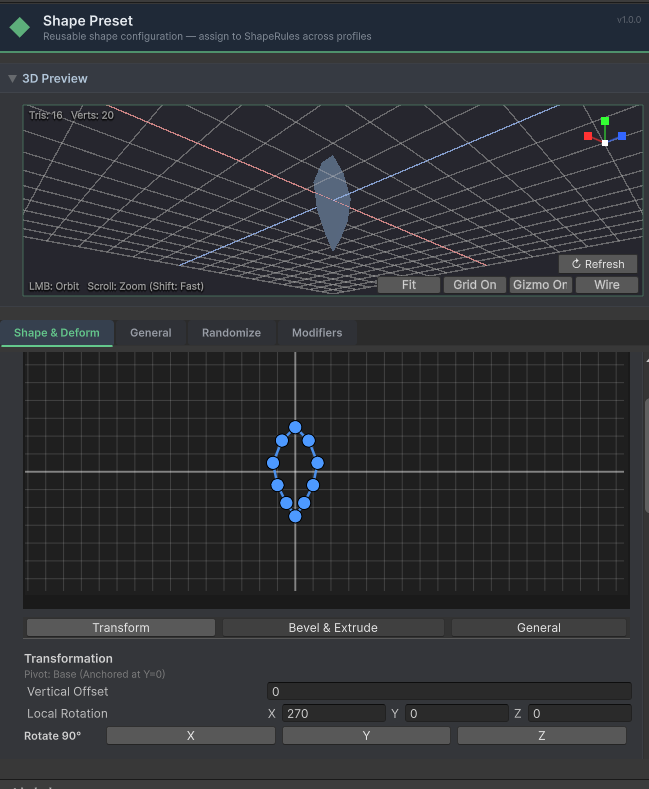 The Extrude primitive inspector showing silhouette drawing, path control points, and taper/twist.
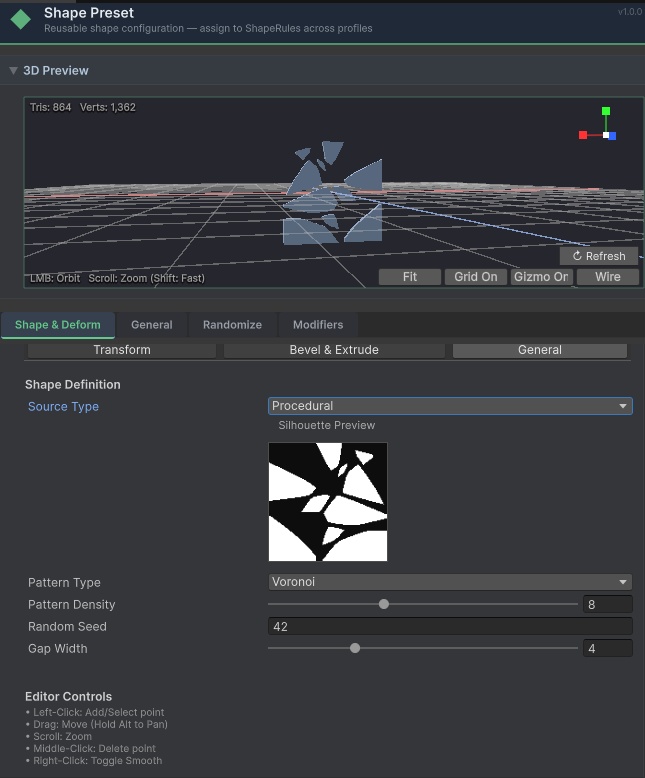 Extrude with mirror symmetry and pattern-based silhouette for a decorative cross-section.
- •Silhouette Curve: Defines the cross-section (circular, square, custom polygon)
- •Path Curve: Interactive Bézier points defining the extrusion sweep
- •Taper/Twist: Profile-driven tapering and twisting over the sweep length
- •Mirror X / Y: Automatically duplicates and reflects your drawn shape across the horizontal or vertical axes (4-way symmetry supported)
- •Clip to Axis / Snap: When enabled alongside mirroring, slices the shape exactly at mirror axes using Sutherland-Hodgman clipping. Guarantees seamless fusing without hidden internal geometry.
Rock
Generates a unique convex hull for every instance.
- •Voronoi Basing: Base shape is derived from multi-point Voronoi cells
- •Feature Points: Number of base shape anchor points
- •Snap Grid: Quantize vertices for a more angular, faceted look
- •Flatness: Vertical compression for flat path stones
- •Jitter: Vertex noise magnitude for surface irregularity
Rock Presets (Quick-Add):
- •Rock Cluster: Interlocking groups of 3-4 rocks for natural formations
- •Path Stone: Flat, chunky stones optimized for low-poly walkways
- •Stone Pillar: Tall, vertical monoliths/menhirs
- •Pebbles: Clustered tiny river stones
- •Sharp Rubble: Highly faceted, craggy debris chunks
23. Shape Modifiers
Shape Modifiers are procedural operations applied after the base mesh is generated but before it's placed. They can be stacked and reordered in any combination.
| Modifier | Description |
|---|---|
| Scatter | Randomly clones the input mesh within a radius |
| Array | Creates linear rows or vertical stacks of the input mesh |
| Transform | Applies a constant translation, rotation, or scale offset |
| Noise | Displaces vertices using persistent Perlin noise |
| Bend | Simple sine-based curve along the Y axis |
| Jitter | Adds low-poly vertex offsets for a hand-crafted look |